Disclaimer: This blog is for general informational and inspirational purposes only, based on publicly available information and personal insights. Images—whether of models, screenshots, or products—are for illustrative purposes only and do not depict actual subjects, scenarios, or views described. We do not intend to offend or conflict with any societal, cultural, religious, or political values.
Photo Editing Mistakes For Photographers: Let’s discuss Some common Photo Editing Mistakes For Photographers. There is no denying that image editing software has given us the provision to make changes in the images with highly functional and simple approaches. By using a few clicks, you can transform the complete outlook of an image. You can effortlessly remove objects, add objects, add colors, correct exposure, and much more. Everything is possible with the help of image editing software. But as we know, if power can enable you to do a task, then there is also a huge possibility of big mistakes. To avoid any kind of gaffe, you need to master the software that is offering you editing services.
5 photo editing mistakes that every photographer is prone to commit:
1. Over Saturation of Colors: To give realistic look and make a picture look alive, you use the color saturation feature in most image editing software. This is where you fall into the trap as sometimes you overdo the task and don’t realize that you have made the object look more fake than ever.
To avoid overdoing, you need to make several changes and observe the image with different looks. Whatever is giving a more real and original look, keep it and omit the second.
2. Immature Use Of Filters: Filters give you the authority to revolutionize any image in Photoshop or other image editing software. It is essential to have a strong grip and acknowledgment of the usage of these features. All software serves you a platter of good filters and all of them can completely transform an image. You don’t have to use every filter for every image. An adept photographer will be aware of the filters that are essential for a particular image. You have to be cautious while applying filter effects.
3. Avoid Chessboard Colors: It is a myth that every image can look great in black and white. It highly depends on the usage of an image and what kind of effects will enhance the demeanor of the object.
Even if you want to apply this feature in all your images, you need to learn level controls.
4. Over-saturated Monochrome Toning: People who have learned Photoshop are very well aware of the fact that there are many ways to add Black and White tones to images. The only mistake here is that photographers become heavy-handed with using colors. It is recommended to keep the color saturation low and in spite of the feature of full-on color; you must go for the slight tint.
5. Dire Masking Selection: If you find the image highly unattractive due to the halos and dodgy edges, you can instantly come to a decision that it has been edited by some immature designer.
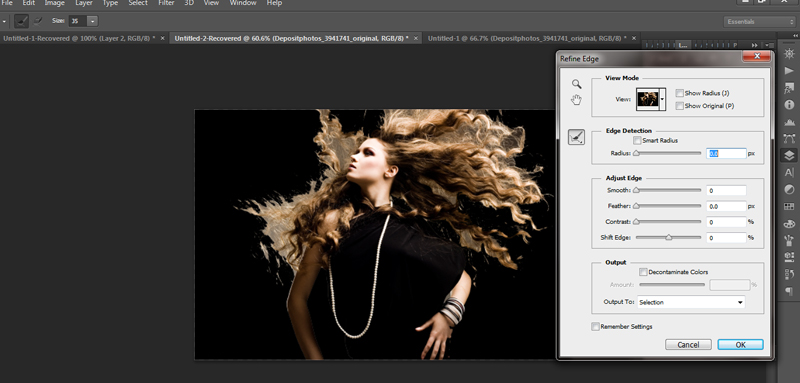 This image is used solely for illustrative purposes. We do not intend to offend or conflict with any societal, cultural, religious, or political values. Image Source: Shutterstock
It becomes even more difficult to implement the technique of masking hair-like details. It is always suggested to use refine edge or refine mask control. Finally, it will provide amazing imagery with more accurate and sharp details.